

In recent months we’ve evolved the Shopware CLI into a more capable tool for day-to-day Shopware development. As part of that work, we’ve improved the project creation flow. What used to be a simple version selector is now an interactive setup wizard that guides developers through local environment setup, deployment targets, and CI/CD configuration.
This helps reduce the total cost of ownership in a practical way by cutting down the setup work that every new project tends to repeat. Developers shouldn’t have to jump between documentation pages, README files, and old projects just to create a solid project foundation.
The starting point
Five months ago, creating a project looked like this:
shopware-cli project create my-shop
You'd get a single drop-down asking you which version to install, and that was it. No guidance to use Docker, no help on common installation issues.
What we changed
A proper interactive wizard
The biggest shift is how the command now feels. Instead of a single drop-down, the CLI now provides a guided experience that walks you through:
Meaningful setup decisions
Project name creation, with inline validation so you don't accidentally overwrite an existing folder
A two-step version picker that lets you choose the minor release first and then the exact patch
A Docker selection step
A yes/no gate for advanced customization that hides deployment, CI/CD, Git, OpenSearch, and AMQP behind a single question
The philosophy here is simple: don't overwhelm new users, but don't hide power from experienced ones either. Therefore all advanced customizations are available, but hidden by default.

Pre-flight checks
We’ve added various additional checks to catch typical installation problems and provide explanations to help you troubleshoot. A few examples of what these new checks address:
When your local PHP environment does not have all PHP extensions, or is outdated for Shopware development
When Docker is wrongly configured on Mac, leading to poor performance
When a Shopware project is created on the Windows disk while using WSL2, which leads to performance and file access issues
With these new checks, we aim to ensure that setting up Shopware is easy and fast regardless of your operating system.
Secure by default
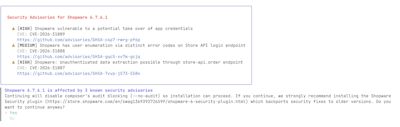
New project creation now blocks Shopware versions with known vulnerabilities by default and asks users to confirm before proceeding:
Deployment and CI/CD templates
One of the most common user pain points when starting a new project has involved digging through docs, or copying from previous projects, to find the right CI configuration. The wizard removes that friction by enabling users to generate necessary config files automatically when they select a deployment target or CI system.
Pick Deployer and GitHub Actions to get a deploy.php file plus bothci.ymlanddeploy.ymlworkflows in.github/workflows/. Pick Shopware PaaS to get a ready-to-goapplication.yaml.
Clear feedback, and how to start
The previous version of the CLI dumped raw Composer output and then exited. New users were left to hunt through documentation and READMEs to figure out what to do next.
The CLI now addresses that gap by providing a success screen that clearly shows what the next steps are:
Try it out yourself
You can try out the new wizard with a single command:
npx @shopware-ag/shopware-cli project create
If you have feedback or suggestions, please file a new GitHub issue in the CLI backlog and share your thoughts.
Conclusion
What started as a simple version picker and a thin wrapper around composer create-project is now a wizard that removes friction from setting up a new Shopware project by guiding you through common setup problems and generating deployment and CI configs for you.